BlackShake: Adding Textured Style to Your Designs
You know the moment. You've got a solid concept, a clean layout, and a message that's ready to land. But something feels a little too polished, a little too digital. It lacks that human touch, that sense of crafted character. This is where a typeface like BlackShake enters the conversation. It's not just another font; it's a design asset with a distinct personality, built to inject immediate style and texture into your projects.
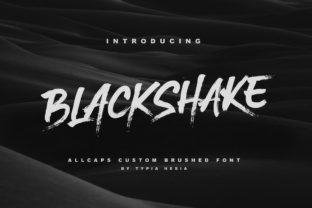
So, what exactly is BlackShake? At its core, it's a cool, textured dry brushed font. This means each letterform appears as if it was painted with a dry brush, leaving behind visible strokes, uneven edges, and a tangible, gritty texture. The result is a typeface that feels organic, energetic, and slightly rebellious. It avoids the sterile perfection of many digital fonts, offering instead a raw, artistic vibe that commands attention. Think of it as the visual equivalent of a well-worn leather jacket or a vintage concert poster—it has a story to tell.
Where BlackShake Truly Shines
The strength of BlackShake lies in its role as a powerful display font. It's designed for impact, not for setting long paragraphs of body text. Its textured, high-contrast nature makes it ideal for headlines, logos, and short, punchy statements where you need to make an immediate visual impression.
- Branding and Logo Design: For brands aiming for an authentic, artisanal, or edgy identity, BlackShake can be transformative. It works beautifully for logos for craft breweries, boutique clothing lines, music venues, barbershops, or any business that wants to project confidence and a handcrafted feel. It helps build a brand identity that feels memorable and distinct.
- Editorial and Packaging Design: Imagine the masthead of a men's lifestyle magazine, the title of a gritty graphic novel, or the label on a small-batch hot sauce. BlackShake adds a layer of visual interest and tactile quality that flat fonts can't match, making it a star in editorial design and packaging design.
- Digital and Social Media: In the crowded space of social media graphics, standing out is everything. Use BlackShake for YouTube thumbnails, Instagram story headers, or podcast artwork to stop the scroll. Its texture holds up well on screens, creating a focal point that draws the eye. For web design, it's perfect for hero section headings or banner text where you want to set a bold tone.
- Personal and Commercial Projects: Beyond professional use, this creative font is a fantastic tool for hobbyists and crafters. Think custom t-shirt designs, vinyl decals for laptops or cars, unique greeting cards, or standout quotes for personal blogs. Its versatility across mediums is a key part of its appeal.
Practical Guidance for Using This Typeface
Adopting a font with as much character as BlackShake requires some thoughtful application. Here’s how to integrate it effectively into your workflow.
Evaluating Fit and Readability
First, consider your project's core message. Is your audience expecting sophistication and minimalism, or do they respond to boldness and creativity? BlackShake leans heavily toward the latter. Its readability is excellent at large sizes, but the texture can become a visual barrier in small text or dense blocks. Always prioritize clarity. Use it for headlines, pull quotes, or logos, and pair it with a clean, simple sans serif font or a classic serif font for body copy. This contrast creates a balanced visual hierarchy.
Testing Font Pairings and Exploring Styles
A good font pairing is essential. The rugged texture of BlackShake pairs well with neutral, geometric sans serifs like Montserrat or Open Sans, or with elegant serifs like Playfair Display for a high-contrast look. Avoid pairing it with other overly decorative or script fonts, as this can create visual chaos.
Check what's included with the font file. Many premium font packages offer additional styles like all-caps versions, alternate characters, or stylistic sets. These extras can provide more flexibility and help you tailor the font's personality to a specific project. Experiment with these in your design software to see what works.
Licensing and Professional Use
If you're using BlackShake for a client project, a product for sale, or any commercial venture, you must ensure you have the correct commercial font license. This is a non-negotiable step in professional practice. The license outlines how you can use the font—whether for a single project, multiple projects, or for embedding in apps or websites. Purchasing a proper license respects the type designer's work and protects you legally.
Ultimately, BlackShake is more than just a set of letters. It's a tool for injecting personality and a human touch into digital and print work. By understanding its strengths as a display typeface, respecting its texture, and pairing it wisely, you can leverage its unique appeal to create designs that are not only seen but felt. It’s a valuable addition to any designer's toolkit, offering a quick way to add that stylish punch your project might be missing.